Understanding AI Application Architecture: How UI, LLMs, RAG, Tool Calling, and MCP Work Together
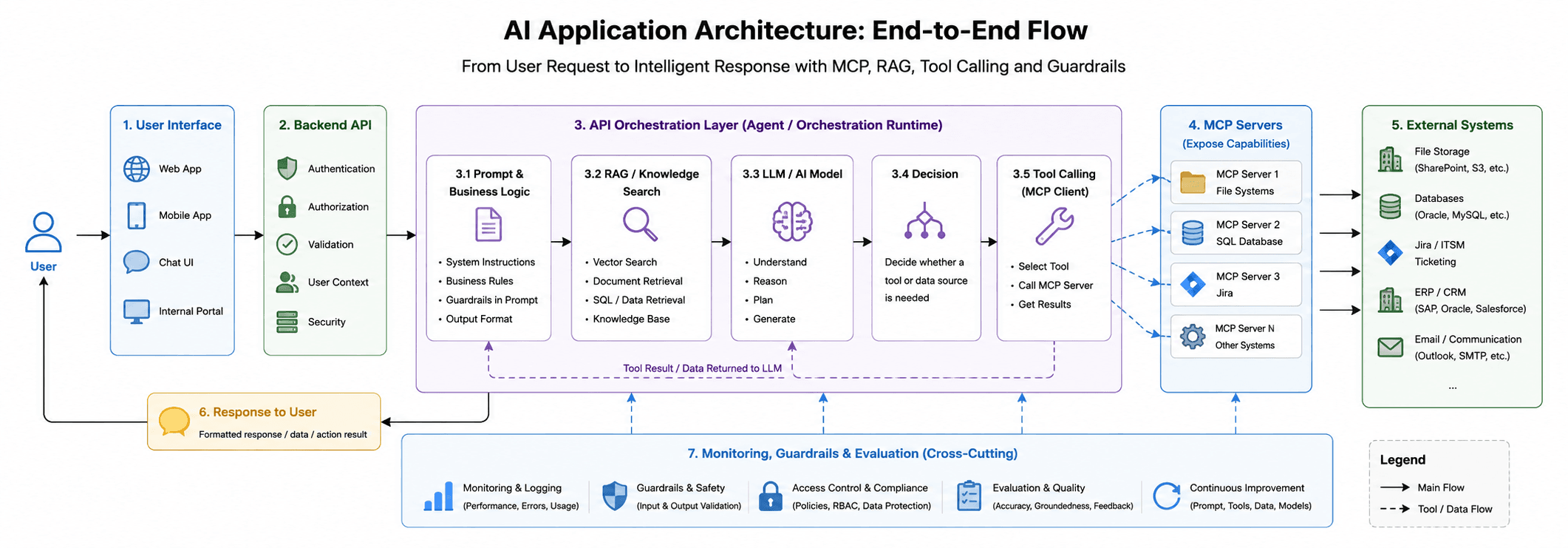
AI applications are not just about calling an LLM. A real solution needs a user interface, backend API, orchestration layer, prompt logic, RAG/knowledge search, tool calling, MCP client and servers, external systems, monitoring, guardrails, and evaluation. This architecture helps AI reason, access trusted data, use tools safely, and deliver reliable business outcomes.
The High-Level Flow
A typical AI application flow looks like this:
User
↓
Web App / Mobile App / Chat UI
↓
Backend API
↓
API Orchestration Layer
↓
Prompt + Business Logic
↓
RAG / Knowledge Search
↓
LLM / AI Model
↓
Decision
↓
Tool Calling / MCP Client
↓
MCP Servers
↓
External Systems
The important point is that the LLM is only one part of the full solution. The real value comes when the model is combined with reliable backend logic, enterprise data, APIs, workflows, and safety controls.
1. User Interface
The user interface is where the user interacts with the AI system.
This could be:
- Web application
- Mobile application
- Chat interface
- Internal admin portal
- Copilot-style assistant
The UI collects the user request and sends it to the backend API.
For example, the user may ask:
Check whether this invoice has a matching Jira ticket.
The UI should not directly call the LLM or external business systems. Instead, it should communicate with the backend API.
2. Backend API
The backend API acts as the secure entry point into the AI application.
It handles:
- Authentication
- Authorization
- Request validation
- Session handling
- User context
- API security
- Communication with the orchestration layer
This is important because API keys, business rules, system credentials, and tool access should not be exposed directly to the frontend.
In a production system, the backend API protects the AI system from misuse and ensures that only valid requests are processed.
3. API Orchestration Layer
The orchestration layer is the brain of the application flow.
It coordinates:
- Prompt preparation
- Business rules
- RAG / knowledge search
- LLM calls
- Tool calling
- MCP client execution
- Error handling
- Retry logic
- Guardrails
- Monitoring
This layer decides how the user request should be processed.
For example, if the user asks a general question, the orchestration layer may send the prompt directly to the LLM.
But if the user asks a business-specific question, the orchestration layer may first retrieve relevant data from documents, databases, or APIs before asking the LLM to respond.
4. Prompt and Business Logic
Before sending anything to the model, the system usually prepares the prompt.
This may include:
- System instructions
- User message
- Business rules
- Retrieved context
- Output format instructions
- Safety rules
For example:
You are an internal support assistant.
Use only the provided context.
If the answer is not available, say that you do not know.
Return the result in JSON format.
Business logic is also important. Not every decision should be left to the LLM. Rules such as approval limits, access permissions, validation checks, and workflow conditions should be controlled by normal application logic.
5. RAG / Knowledge Search
RAG means Retrieval-Augmented Generation.
It allows the AI application to search trusted knowledge before generating an answer.
The knowledge source may include:
- Documents
- PDFs
- Policies
- Product manuals
- SQL data
- ERP records
- CRM records
- Knowledge base articles
The goal of RAG is to reduce hallucination and make the answer more grounded.
Instead of asking the LLM to guess, the system first retrieves relevant context and then asks the model to answer based on that context.
A simple RAG flow looks like this:
User question
↓
Search relevant knowledge
↓
Send retrieved context to LLM
↓
Generate grounded response
6. LLM / AI Model
The LLM is responsible for language understanding, reasoning, summarization, classification, and response generation.
It can help with tasks such as:
- Answering questions
- Summarizing documents
- Extracting structured data
- Classifying requests
- Generating email drafts
- Deciding whether a tool is needed
However, the LLM should not directly access every system. It should work through controlled layers such as the orchestration layer, tool calling layer, and MCP client.
7. Decision Step
In agentic AI applications, the model may need to decide what to do next.
For example:
User asks: Check whether this customer has an open Jira ticket.
The model may decide:
I need to search Jira.
Then the orchestration layer can call the correct tool.
The decision step is where the AI moves from simple text generation to action-oriented behavior.
8. Tool Calling and MCP Client
Tool calling allows the AI application to interact with external systems.
For example:
- Search a file system
- Query a SQL database
- Create a Jira ticket
- Check an ERP invoice
- Send an email
- Fetch CRM customer details
This is where MCP, or Model Context Protocol, becomes useful.
MCP provides a standard way for AI applications to connect with tools and data sources.
In the architecture, the MCP client sits inside the AI application or orchestration layer. It connects to one or more MCP servers.
AI Application / Orchestration Layer
↓
MCP Client
↓
MCP Server
↓
External System
One MCP client can connect to multiple MCP servers.
For example:
MCP Client
├── MCP Server 1 → File Systems
├── MCP Server 2 → SQL Database
└── MCP Server 3 → Jira
This gives the AI application a controlled way to access external capabilities.
9. MCP Servers and External Systems
MCP servers expose external systems to the AI application in a structured way.
Each MCP server can represent a specific system or capability.
Examples:
MCP Server 1 → File Systems
MCP Server 2 → SQL Database
MCP Server 3 → Jira
MCP Server 4 → CRM
MCP Server 5 → ERP
The AI model does not need to know the internal API details of each system. Instead, the MCP server exposes usable tools and resources.
For example, instead of the model knowing a Jira REST API endpoint, the MCP server can expose a tool like:
search_jira_ticket()
create_jira_ticket()
update_jira_status()
This makes the tool usage more AI-friendly and easier to control.
10. Tool Result Returned to the LLM
Tool calling is usually not a one-way process.
The flow often looks like this:
LLM decides a tool is needed
↓
MCP Client calls MCP Server
↓
External system returns data
↓
Tool result is passed back to the LLM
↓
LLM generates final response
This feedback loop is important.
The model uses the returned result to produce a meaningful final answer for the user.
For example:
I found an open Jira ticket for this invoice: FID-1234.
The current status is In Progress, and it is assigned to the integration team.
11. Monitoring, Guardrails, and Evaluation
A production AI system also needs operational controls.
Monitoring helps track:
- Token usage
- Cost
- Latency
- Errors
- Tool failures
- User feedback
- Model responses
Guardrails help protect the system:
- Input validation
- Output validation
- Access control
- Sensitive data filtering
- Human approval for high-risk actions
Evaluation helps measure quality:
- Is the answer correct?
- Is it grounded in data?
- Did the model call the right tool?
- Did the system follow business rules?
- Did the response format match expectations?
Without monitoring and guardrails, AI systems can become difficult to trust in production.
Why This Matters for Integration Architecture
AI development and integration architecture are becoming closely connected.
Traditional integration focuses on connecting systems:
ERP ↔ CRM ↔ Database ↔ Email ↔ Ticketing System
AI-enabled integration adds reasoning and natural language on top of those connections.
The new architecture becomes:
User request
↓
AI reasoning
↓
Business context
↓
Tool calling
↓
Enterprise systems
↓
Final response or action
This is especially useful for enterprise scenarios such as:
- Invoice processing
- Customer support automation
- ERP data lookup
- CRM enrichment
- Jira ticket creation
- Document analysis
- Internal knowledge assistants
- Workflow automation
Conclusion
An AI application is not just an LLM.
A reliable AI application needs a proper architecture that combines:
- User interface
- Backend API
- Orchestration layer
- Prompt and business logic
- RAG / knowledge search
- LLM reasoning
- Tool calling
- MCP client and servers
- External systems
- Monitoring
- Guardrails
- Evaluation
The LLM provides intelligence, but the surrounding architecture provides control, reliability, security, and business value.
For integration architects and software developers, this is an important shift.
AI is not replacing integration architecture.
It is extending it with reasoning, natural language, and intelligent automation.