Understanding SQL Server Role and Access Inspection Through a Data Model
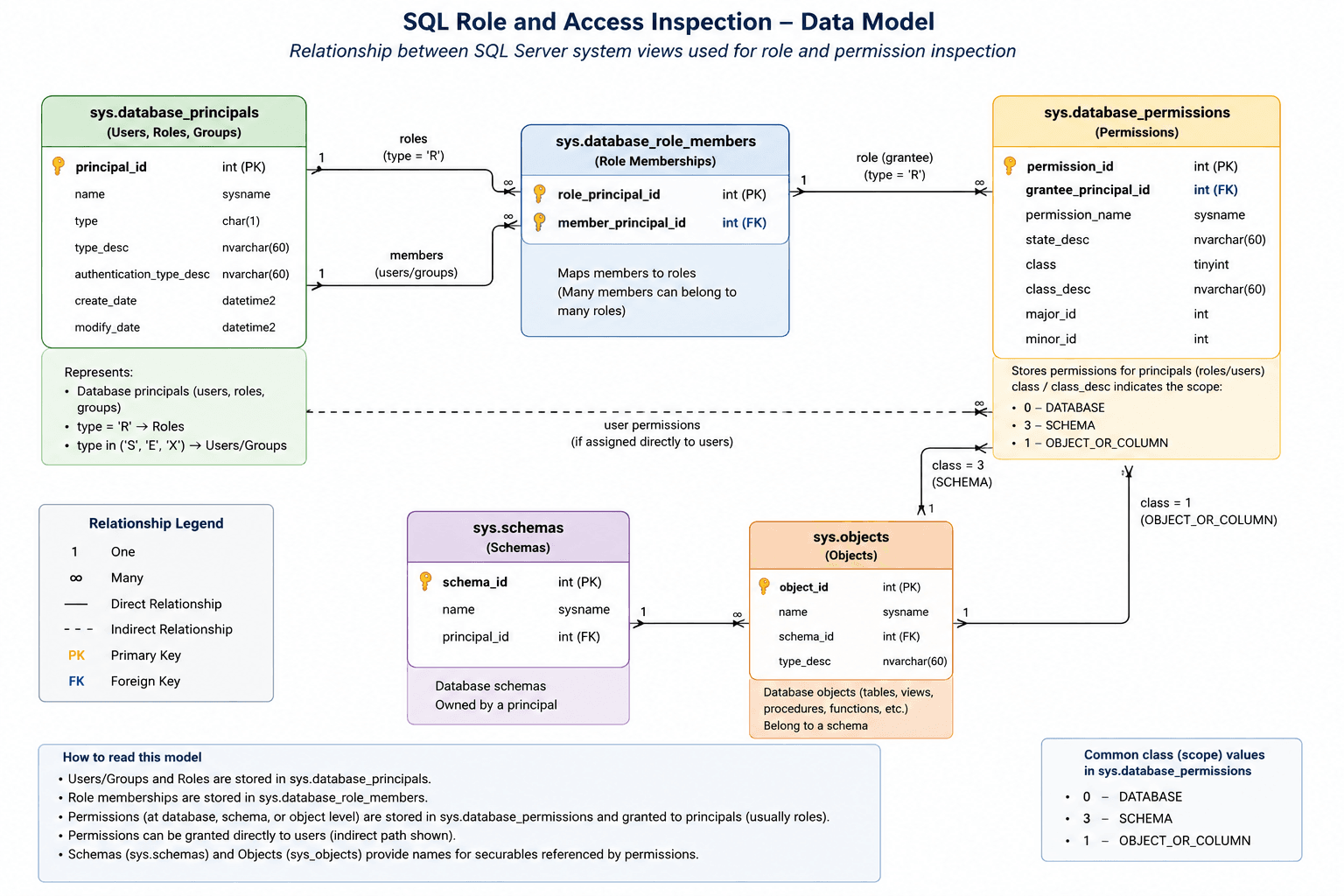
A practical explanation of how SQL Server stores users, roles, permissions, schemas, and objects, and how to inspect database access using system views.
Why a Data Model Helps
When working with SQL Server security, it is easy to run individual queries and get partial answers.
For example, one query may show all database users. Another query may show all roles. Another query may show role permissions. But unless we connect these pieces together, we may not get the full picture.
A data model gives us a structured view of how SQL Server stores access-related information internally.
The key system views involved are:
| System View | Purpose |
| --------------------------- | ------------------------------------------------------------- |
| `sys.database_principals` | Stores users, roles, and external groups |
| `sys.database_role_members` | Maps users or groups to database roles |
| `sys.database_permissions` | Stores permissions granted to users or roles |
| `sys.schemas` | Stores database schema information |
| `sys.objects` | Stores database objects such as tables, views, and procedures |
Database Principals
The starting point is sys.database_principals.
This view contains database-level security principals such as:
- SQL users
- External users
- External groups
- Database roles
In SQL Server, both users and roles are stored in the same system view. The difference is identified using the type column.
For example:
- R represents database roles
- S represents SQL users
- E represents external users
- X represents external groups
This is important because roles are not stored in a separate role table. They are also principals.
Role Memberships
The next important view is sys.database_role_members.
This view acts like a relationship table between users and roles.
It contains two important columns:
- role_principal_id
- member_principal_id
Both values point back to sys.database_principals.
This means a role is a principal, and a user or group is also a principal. The membership table connects them together.
In simple terms:
One role can have many members.
One user or group can belong to many roles.
This is what makes SQL Server access flexible, but it can also make access harder to understand without a clear model.
Permissions
Permissions are stored in sys.database_permissions.
This view tells us what permission has been granted and to whom.
The important columns include:
- grantee_principal_id
- permission_name
- state_desc
- class
- class_desc
- major_id
- minor_id
The grantee_principal_id points to the principal receiving the permission. In many cases, this will be a database role. However, permissions can also be granted directly to a user.
The permission_name shows the type of permission, such as:
- SELECT
- INSERT
- UPDATE
- DELETE
- EXECUTE
The state_desc shows whether the permission is granted, denied, or granted with further grant permission.
Permission Scope
One of the most important parts of access inspection is understanding the scope of a permission.
A permission can be applied at different levels:
| Class | Scope |
| ----- | ---------------------- |
| `0` | Database level |
| `3` | Schema level |
| `1` | Object or column level |
This matters because access granted at a higher level may not appear as individual table-level permissions.
For example, if a role has SELECT permission at schema level, the role may be able to read all tables in that schema. You may not see one row per table in the permissions view.
Similarly, built-in roles such as db_datareader and db_datawriter provide broad access without listing every object individually.
Schemas and Objects
To understand object-level and schema-level access, we also need to look at:
- sys.schemas
- sys.objects
sys.schemas helps resolve schema-level permissions.
sys.objects helps resolve object-level permissions, such as access to tables, views, stored procedures, or functions.
When sys.database_permissions.class_desc is SCHEMA, the major_id refers to a schema.
When class_desc is OBJECT_OR_COLUMN, the major_id refers to an object.
This is why permission inspection queries often use logic like:
CASE
WHEN perm.class_desc = 'OBJECT_OR_COLUMN' THEN OBJECT_NAME(perm.major_id)
WHEN perm.class_desc = 'SCHEMA' THEN SCHEMA_NAME(perm.major_id)
ELSE perm.class_desc
END AS securable
End-to-End Access Mapping
The most useful view is often the combined mapping:
User → Role → Permission → Object/Schema/Database
This helps identify the effective access path.
For example:
A user may not directly have SELECT permission on a table.
But the user may belong to a role.
That role may have SELECT permission on a schema.
Therefore, the user effectively has read access to objects inside that schema.
This kind of mapping is very useful during:
- Security audits
- Access reviews
- Production support
- Migration planning
- Troubleshooting permission errors
- Compliance checks
- Database hardening activities
Why Built-in Roles Need Special Attention
SQL Server has built-in database roles such as:
- db_datareader
- db_datawriter
- db_owner
These roles are powerful.
For example, db_datareader gives read access to all user tables and views in the database. db_datawriter gives insert, update, and delete access to all user tables.
The important point is that these permissions may not appear as individual object-level permissions in the same way custom permissions do.
So, when inspecting access, we should not only check sys.database_permissions. We should also check role memberships carefully.
A user who belongs to db_datareader may have broad access even if no direct table-level permission is visible.
Conclusion
SQL Server access inspection becomes much easier when we look at it as a data model.
The core relationship is:
Principals define users and roles.
Role memberships connect users to roles.
Permissions define what those principals can do.
Schemas and objects define where those permissions apply.
By connecting these views together, we can clearly understand:
- Who has access
- How the access is granted
- What level the access applies to
- Whether access is direct or inherited
- Which roles may be giving broad permissions
Good database security starts with visibility. A clear access data model gives us that visibility.