Using Azure Functions with Logic Apps for Complex Integration Scenarios
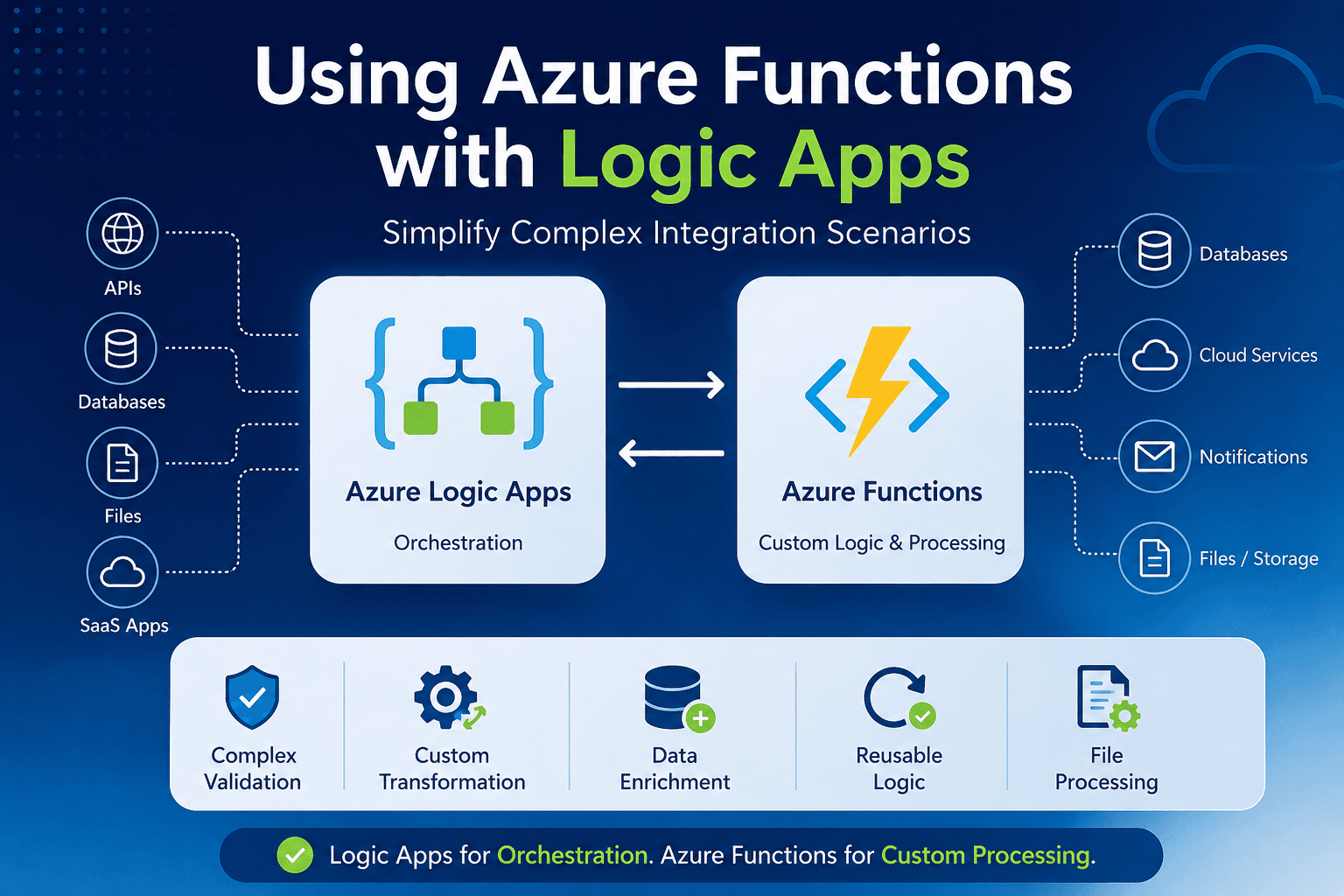
Azure Logic Apps is excellent for orchestrating integration workflows, but some scenarios are easier to manage with code. This blog explains how Azure Functions can complement Logic Apps by handling complex validation, custom transformations, data enrichment, reusable business logic, and file processing. By keeping Logic Apps as the orchestration layer and using Azure Functions for custom processing, integration solutions can become cleaner, more reusable, easier to test, and simpler to maintain.
Logic Apps as the Orchestration Layer
Logic Apps is very good at orchestration.
It can manage the flow between different systems, such as:
- Receiving requests from source systems
- Calling APIs
- Reading or writing files
- Sending messages to queues
- Triggering downstream systems
- Handling approvals or business process steps
- Monitoring workflow execution
In an integration solution, Logic Apps can act as the main coordinator.
It decides what should happen, when it should happen, and which system should be called next.
But orchestration and complex processing are not always the same thing.
Sometimes, a workflow may need logic that is easier to write in code than in workflow expressions.
Where Azure Functions Fit In
Azure Functions is useful when we need to execute custom code as part of an integration workflow.
Instead of building every rule or transformation inside Logic Apps, we can move some of the complex logic into a Function App.
The Logic App can call the Function App, pass the required input, receive the response, and continue the workflow.
This keeps the Logic App cleaner and allows the custom logic to be written in programming languages such as C#, JavaScript, or Python.
Common Scenarios for Using Azure Functions with Logic Apps
1. Complex Validation
Some validation rules are simple.
For example:
Check if a field is empty
Check if a value is greater than zero
Check if a status equals a specific value
These can be handled directly in Logic Apps.
But some validation rules can become more complex.
For example:
Validate multiple dependent fields
Apply different rules based on customer type
Validate nested JSON structures
Compare incoming data with existing records
Apply business-specific validation logic
In such cases, writing the validation logic in C#, JavaScript, or Python can be much easier.
The Function App can receive the payload, validate it, and return a result such as: {
"isValid": false,
"errors": [
"Customer ID is missing",
"Order date cannot be in the past",
"Currency code is not supported"
]
} The Logic App can then decide whether to continue the process, stop the workflow, or send the error details to another system.
2. Custom Transformation
Logic Apps provides expressions and data operations for transformation.
For simple mappings and formatting, this works well.
But when transformation logic becomes large, the workflow can become hard to read and maintain.
For example:
Complex JSON restructuring
Conditional field mapping
Date and number formatting
Combining data from multiple sections
Creating output payloads based on business rules
Handling optional or missing fields
If the transformation requires many Logic App expressions, it may be better to move that transformation into an Azure Function.
The Function App can receive the input payload and return the transformed output.
This makes the Logic App easier to understand because the transformation is handled in one dedicated code component.
3. Data Enrichment
In many integrations, the source system may not send all the required information.
For example, an incoming order may contain only a customer ID. But the target system may need customer name, address, tax details, or account information.
In this case, a Function App can be used for data enrichment.
The Function App can:
Receive the original payload
Call a database or external API
Fetch additional information
Add the required data to the payload
Return the enriched payload to the Logic App
The Logic App can then continue with a complete and enriched message.
This approach is useful when the enrichment logic is more than a simple API call or when multiple systems need to be queried before preparing the final payload.
4. Reusable Business Logic
In enterprise integration, the same logic may be needed in multiple workflows.
For example:
Validate customer data
Format address details
Generate a reference number
Convert currency
Apply tax rules
Normalize status values
Validate file naming conventions
If we build this logic separately in every Logic App, it can lead to duplication.
When the logic changes, we may need to update many workflows.
Instead, we can place the common logic inside an Azure Function and call it from multiple Logic Apps.
This improves reusability and makes maintenance easier.
The pattern becomes simple:
Multiple Logic Apps → Same Azure Function → Common reusable logic
5. File Processing
Logic Apps can work with files using connectors such as Blob Storage, SFTP, SharePoint, OneDrive, and others.
But some file processing scenarios may require custom logic.
For example:
Reading large files
Parsing custom file formats
Splitting files into smaller parts
Validating file content
Converting file formats
Generating structured JSON from file data
Applying business rules to each row
In such cases, Azure Functions can be a better fit for the processing part.
The Logic App can detect or receive the file, then pass the file reference or content to an Azure Function for processing.
After processing, the Function App can return the result or store the processed output in another location.
A Simple Architecture Pattern
A clean architecture can look like this:
Source System
↓
Logic App
↓
Azure Function
↓
Logic App
↓
Target System
In this model:
Logic Apps = Orchestration
Azure Functions = Custom logic and processing
The Logic App manages the overall integration flow.
The Azure Function handles the parts that are easier to build, test, and maintain in code.
Why This Combination Works Well
Using Azure Functions with Logic Apps gives us a practical balance.
Logic Apps provides low-code orchestration, connectors, workflow visibility, retry policies, and integration capabilities.
Azure Functions provides flexibility for custom code, complex logic, reusable components, and advanced processing.
Together, they can help us build integration solutions that are:
- Cleaner
- More maintainable
- More reusable
- Easier to test
- Easier to support
- Better structured
Important Design Consideration
This does not mean every Logic App should use Azure Functions.
For simple workflows, Logic Apps alone may be enough.
We should use Azure Functions when the logic becomes too complex, too repetitive, or too difficult to maintain inside the Logic App workflow.
A good question to ask is:
Is this logic easier to understand and maintain as code?
If the answer is yes, then Azure Functions may be the better place for that logic
Conclusion
Azure Logic Apps is a strong orchestration platform for enterprise integration.
But in real-world integration scenarios, there will often be cases where custom logic, validation, transformation, enrichment, or file processing becomes difficult to manage directly inside the workflow.
Azure Functions can complement Logic Apps by handling these code-friendly parts of the solution.
The goal is not to replace Logic Apps with Azure Functions.
The goal is to use both in the right place.
Logic Apps can remain the orchestration layer, while Azure Functions can handle custom processing.
This combination makes Azure Integration Services solutions cleaner, more flexible, and easier to maintain.